In-App via Stripe
Follow these steps to subscribe to Portfolio++ Pro using Stripe.
Step 1 - Open Portfolio++
Navigate to Portfolio++.
Step 2 - Open the Upgrade Menu
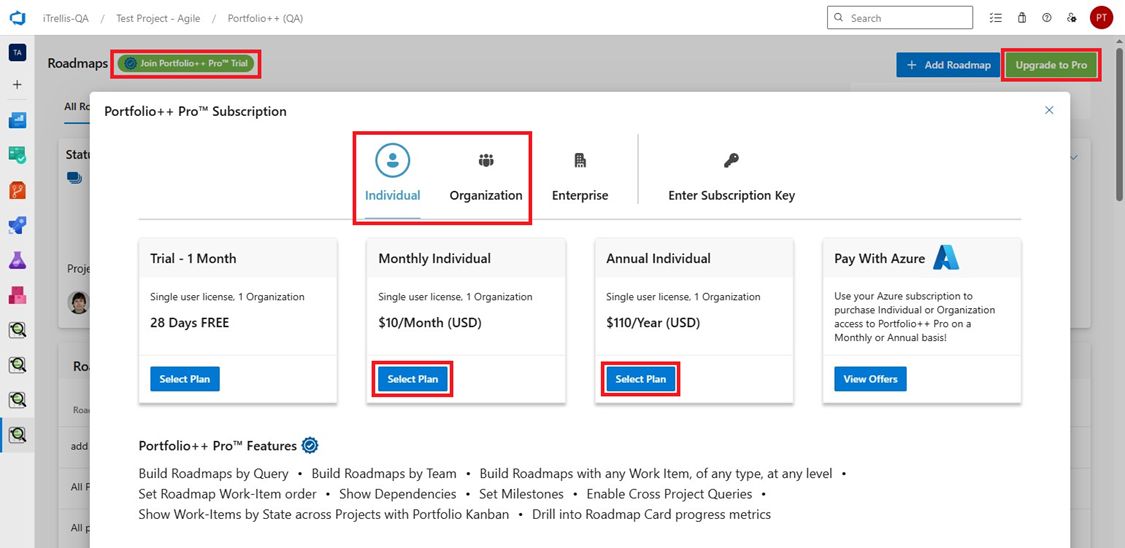
Click the green Join Portfolio++ Pro Trial or Upgrade to Pro button in the top left or right corner of the screen.
Step 3 - Choose Plan Type
Select either Individual or Organization.
- Individual - Pro features apply only to your account.
- Organization - Pro features apply to all users in your organization.
Step 4 - Select Billing Plan
Click Select Plan for either Monthly or Annual billing.
Step 5 - Enter Payment Information
You will be redirected to the Stripe checkout page to complete your payment.
Currently supported payment methods
- Credit Card
- ACH Direct Debit (US & Canada)
- Bank transfer (US, UK, Europe, Japan and Mexico)
- Link
- Amazon Pay
- Google Pay
- Apple Pay
- Cash App Pay
- Korean cards
Step 6 - Complete Subscription
Click Subscribe to process the transaction.
Your Portfolio++ Pro subscription will remain active with automatic monthly or yearly renewals, depending on your selected plan.
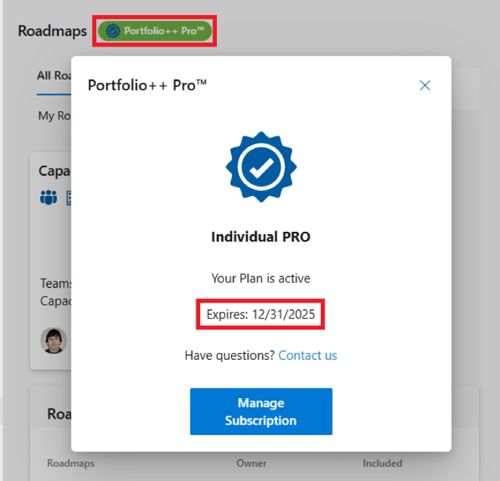
You can check the subscription expiration date at any time by clicking the green Portfolio++ Pro button.