Build By Project, Team or Query
Overview
Use this page to build your roadmap by selecting work items from a project, team, or query. You can refine what is included, filter out completed work, and organize the selected items before adding them to the roadmap.
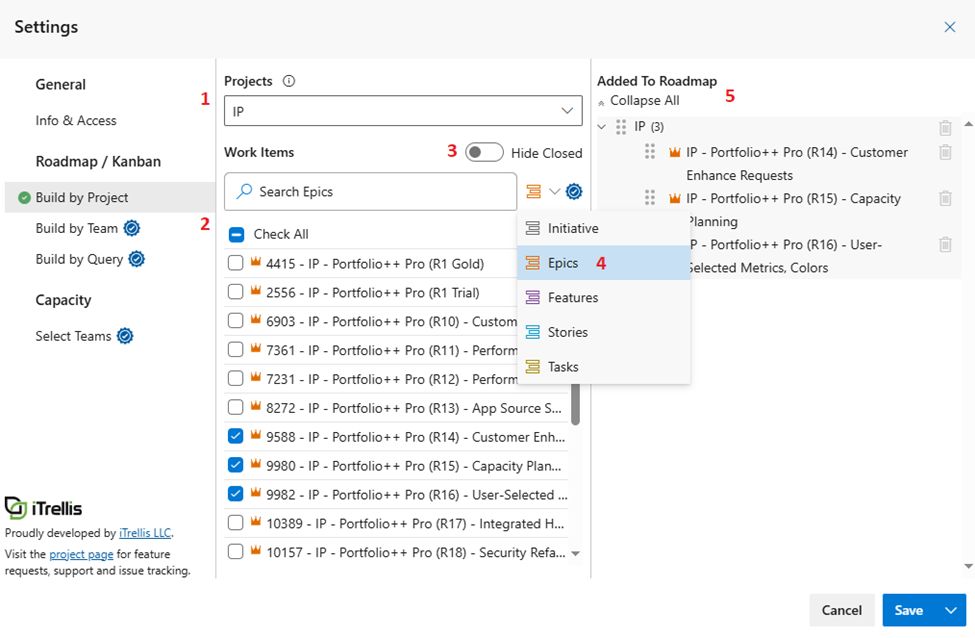
1) Choose Project
Choose the Project you want to work with.
2) Select Work Items or Queries
Select the Work Items or Shared Queries to include in the Roadmap.
Use the search box to quickly find items by name when working with large lists.
Selecting by Teams or Shared Queries is a Pro feature.
3) Hide Closed
Enable Hide Closed to hide all closed Work Items, making it easier to focus on current items.
4) Additional Work Item Types (Pro feature)
Select non-Epic work item types to include in the roadmap.
5) Review Added to Roadmap
Review the Added to Roadmap list:
- Click the trash can icon to remove a team or project.
- Reorder items by dragging the ⠿ icon. (Pro feature)