Capacity (Pro Feature)
Overview
The Capacity View in Portfolio++ helps teams answer two critical questions:
- Do we have the capacity to deliver the planned work?
- What will it cost?
This view integrates directly with Azure DevOps, displaying capacity, commitments, completed work, forecasts, and budgets for each team and iteration. It allows organizations to balance workloads, avoid over-commitment, and make informed budgeting decisions.
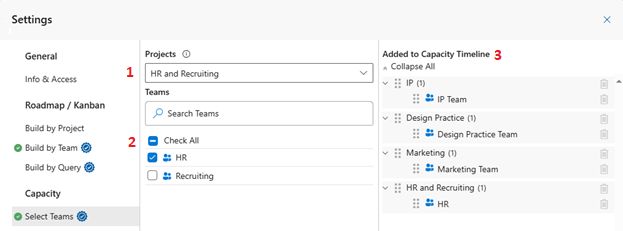
1) Choose Project
Choose the Project you want to work with.
2) Select Teams
Select the Teams to include in the Capacity View.
Use the search box to quickly find teams by name when working with many teams.
3) Review Added to Capacity Timeline
Review the Added to Capacity Timeline list:
- Click the trash can icon to remove a team or project.
- Reorder items by dragging the ⠿ icon.